




Disclaimer: This article is for general informational purposes only. Audio/video equipment, settings, and safety needs vary by home. Always follow manufacturer instructions and local safety guidance before mounting TVs, running cables, or modifying electrical setups.
When people in the U.S. say they want a home theater setup on a budget, what they usually mean is this: they want movie-night sound that feels “big,” clear dialogue that doesn’t require blasting the volume, and a setup that doesn’t look like a messy science project.
This guide is written for that exact person especially the beginner who’s tempted to buy the flashiest box first, then wonders why it still sounds “meh.”
This article is based on real-world, beginner conditions open living rooms, couches against walls, neighbors on the other side, and a mix of streaming, sports, and gaming.
It’s also written to be practical: it shows what to buy (in categories), what to skip, how to set it up, and how to fix the most common issues without turning the living room into a construction zone.
Quick Intro (A “Good Enough” Starting Point That Actually Worked)
The author’s first “serious” system wasn’t expensive. It was a budget-friendly TV and audio pairing built around a living room TV, a simple audio upgrade, and a few setup steps that most beginners skip.
The difference was immediate: dialogue became readable, action scenes gained impact, and the volume stopped creeping higher just to understand voices.
What surprised the author most wasn’t the gear it was how much performance came from fundamentals:
- getting speaker height and distance right
- taming echo and reflections
- using basic calibration instead of “default everything”
Beginners often make the same mistake: they buy something flashy, then ignore placement, cables, settings, and room problems. This guide fixes that.
The 3 Budget Paths (Pick One and Commit)
Path A — Fastest improvement (2.1 starter)
A lot of beginners get better results faster by choosing a simple 2.1 vs 3.1 vs 5.1 system decision and starting small: two speakers plus one subwoofer.
This path is perfect when the room is small, the layout is awkward, or the household wants clean audio without a surround speaker project.
A strong 2.1 approach usually means:
- bookshelf speakers for TV audio (or compact speakers)
- a subwoofer for impact, tuned correctly
It also avoids a common pitfall: latency. If a device relies heavily on wireless audio, Bluetooth vs Wi-Fi audio latency can become noticeable during movies or gaming.
The best budget move is often staying wired through HDMI and letting the TV/receiver handle timing cleanly.
When 2.1 is the best choice
This is the “quiet power” path for:
- small rooms
- shared walls and neighbors
- low-volume viewing
It pairs well with late-night listening modes and night mode settings for apartments, because the system can keep dialogue clear while reducing harsh peaks that annoy others.
Path B — Dialogue first (3.1)
If the household’s top complaint is “voices are hard to hear,” the 3.1 path is usually the best value. The entire purpose is intelligibility turning mumbled dialogue into crisp speech without turning the volume into a neighborhood event.
This is where 3.1 system benefits for dialogue show up immediately:
- voices lock to the screen
- volume stays lower
- action scenes don’t drown out speech
A beginner 3.1 setup can still be budget-friendly by choosing a best cheap center channel speaker that matches the general sound of the left/right speakers (it doesn’t need to be “luxury,” just coherent).
Then the system can use dialogue clarity settings to sharpen speech, and it can improve dialogue without raising volume through EQ presets and correct placement.
Path C — Real surround (5.1 starter)
If the goal is immersion crowd noise behind, ambient sounds around, and that “the room became the scene” feeling then a 5.1 approach is the natural choice.
A starter 5.1 speaker package is often the simplest way to reduce mismatched speakers and setup confusion. But the room matters more than the box, especially for:
- speaker placement for small rooms
- 5.1 setup in an open floor plan
- best speaker layout for a couch against wall
Optional upgrade: Atmos without remodeling
If the reader wants height effects without cutting the ceiling, explore Dolby Atmos beginner options by comparing ceiling speakers vs upfiring modules.
This is where Dolby Atmos can be “nice to have,” not “required,” especially on a tight budget.
Budget-Friendly TV and Audio Pairing (Don’t Overspend on the Wrong Piece)
TV-first vs audio-first: the author’s rule of thumb
The author’s rule is simple: buy what the room can use. If the TV is decent, audio upgrades create a bigger “wow” per dollar. If the TV is old or too small for the viewing distance, the best sound in the world still won’t fix tiny, dim visuals.
The best strategy is a balanced approach:
- choose reliable connections
- match screen size to seating distance
- match audio complexity to room layout
Projector vs TV for beginners (what the author would choose today)
This question is common: projector vs TV for beginners. In many U.S. living rooms, a TV wins for simplicity better daytime viewing, fewer mounting decisions, and less screen management.
A projector can be incredible, but it’s usually a better fit in a controlled-light space.
For beginners who do go projector, keep it simple:
- choose budget projector screen options (even a fixed frame or pull-down screen)
- plan light control first
This is where 4K UHD becomes relevant: many setups look great at 4K, but only if the environment supports it.
If choosing TV: picture basics for movie nights
Two common beginner wins:
- enable the correct HDR mode
- stop using overly bright “store demo” presets
This is where 4K HDR settings basics matter. The author suggests starting with a cinema/movie preset and then using a simple approach to calibrate TV picture for movies. It also helps to understand HDR vs Dolby Vision basics so settings make sense.
When the content supports it, HDR10 and Dolby Vision can both look excellent the key is using a consistent picture mode and avoiding unnecessary processing that adds artifacts.
Screen size + seating distance (simple math, big impact)
If the screen feels small, viewers lean in, strain, and the experience loses impact. Use a seating distance from TV chart to sanity-check the setup and apply how to choose screen size for distance before buying anything else.
Gaming considerations (low lag, correct passthrough)
For gaming households, the TV settings are not optional. The author recommends:
- enabling game mode to avoid input lag on TV
- checking TV refresh rate for gaming and movies
Consoles like PlayStation 5 and Xbox Series X can output great video and audio, but the audio chain matters. Ensure gaming console audio passthrough is configured so the receiver/sound system gets the proper format without weird downmixing.
Soundbar vs Receiver (The Beginner Fork in the Road)
Soundbar vs receiver comparison (honest pros/cons)
A clear soundbar vs receiver comparison saves money and regret.
Soundbars win when:
- the household wants the simplest install
- the room is small
- there’s no desire to upgrade later
Receivers win when:
- the household wants real speakers and real upgrades
- they want better channel separation and flexibility
For many beginners, the best starting point is a best value soundbar for movies especially if the room is small and the budget is tight. But if the goal is scaling up to surround later, a receiver path avoids rebuying the whole system.
Entry-level AV receiver guide (features that actually matter)
This entry-level AV receiver guide focuses on what improves life immediately. The author recommends looking for:
- enough HDMI inputs for streaming + console
- room correction tools
- reliable ARC/eARC support
- a clean on-screen setup
These are the beginner AV receiver features to look for not marketing wattage. In fact, receiver wattage myths explained is simple: most living rooms don’t need extreme watts; they need clean setup, correct speaker size settings, and good placement.
Room correction: why it’s a budget cheat code
The author’s biggest “why didn’t I do this sooner?” moment came from learning how to run room correction and applying home audio calibration basics. Even budget systems can sound dramatically better when the receiver measures the room and corrects levels and timing.
Common platforms include:
- Audyssey
- Dirac Live
- YPAO (Yamaha)
- MCACC (Pioneer)
These tools are not magic, but they reduce common beginner problems quickly.
Used vs refurbished: how the author shops to stretch dollars
Buying smart often matters more than buying new. A practical approach includes:
- following a used receiver buying checklist
- using refurbished audio gear tips to avoid risky purchases
What to check before buying used speakers
Before buying used, confirm the basics: driver condition, cabinet integrity, and connections. This is the beginner’s baseline for used speakers what to inspect.
Connections Made Simple (So Everything Actually Works)
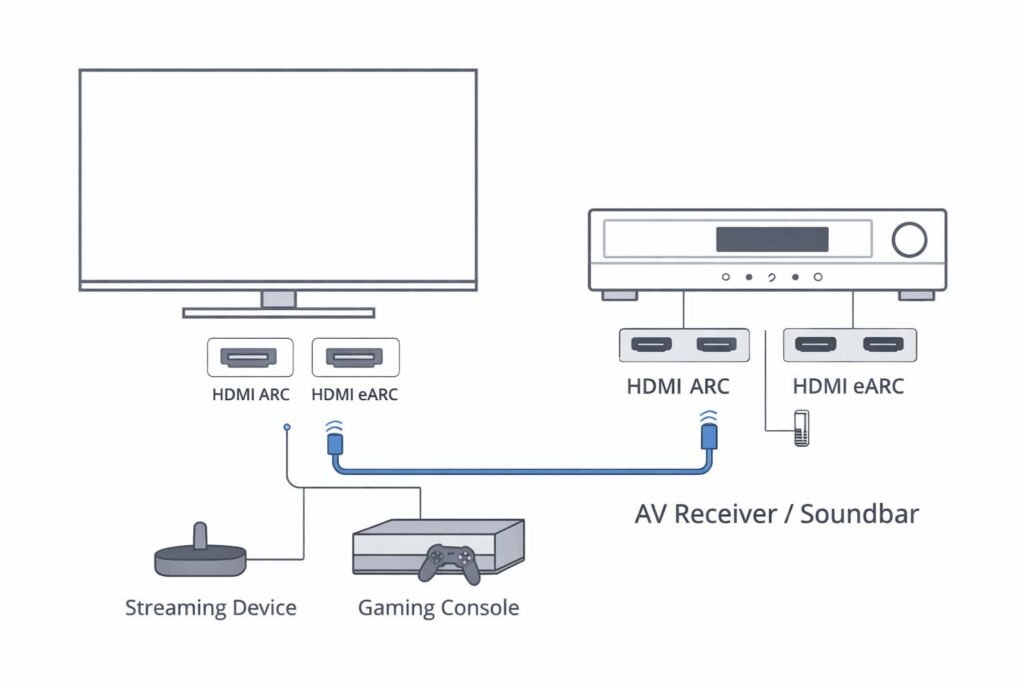
HDMI ARC and eARC setup
Most beginner connection pain disappears when the system is wired cleanly. A correct HDMI ARC and eARC setup typically means:
- TV HDMI ARC port connected to receiver/soundbar ARC port
- CEC enabled when needed
- streaming device connected either to TV or receiver based on simplicity
This section matters because terms confuse beginners:
- HDMI ARC vs HDMI eARC
- compatibility rules like HDCP 2.2
- control behavior via CEC (Consumer Electronics Control)
The “ARC not working” fix list
When there’s no sound, beginners panic. The author uses a short, repeatable flow for ARC not working troubleshooting:
- Power down everything (TV, receiver/soundbar, streaming device).
- Unplug power for 60 seconds (this resets handshake issues).
- Confirm the HDMI cable is seated firmly at both ends.
- Verify ARC is enabled in TV audio settings.
- Verify CEC is enabled (sometimes required for ARC).
- Turn on TV first, then receiver/soundbar.
- Test with one app and one source before changing multiple settings.
This solves a surprising percentage of “it used to work” failures.
eARC audio dropouts fix (common causes)
If audio cuts out or stutters, the issue is often cable quality or handshake instability. A practical eARC audio dropouts fix includes:
- trying a shorter cable run
- avoiding tight bends behind wall mounts
- ensuring the cable meets HDMI cable specs for 4K
Streaming device for 4K TV (when built-in apps aren’t enough)
Built-in TV apps are fine until they aren’t. A dedicated streaming device for 4K TV can improve stability and format support. The author treats this as a reliability decision more than a picture decision.
This is also where streaming box vs smart TV apps becomes real: external boxes often get updates longer, run faster, and handle audio formats more predictably.
Common options include:
- Apple TV 4K
- Roku Ultra
- Amazon Fire TV Stick 4K Max
- NVIDIA Shield TV
- Chromecast with Google TV
Streaming services + formats (why some sound better)
Different apps output different formats. Understanding streaming audio formats explained helps the beginner avoid blaming speakers for what is actually an audio track choice.
Examples the author commonly sees:
- Dolby Digital Plus on streaming platforms
- DTS:X more commonly on certain discs or specific setups
Real-world services many homes use:
- Netflix, Prime Video, Disney+, Max (HBO)
- YouTube for trailers and casual content
- Spotify for music (where stereo imaging matters)
Speaker Placement That Works in Real Homes (Not Ideal Diagrams)
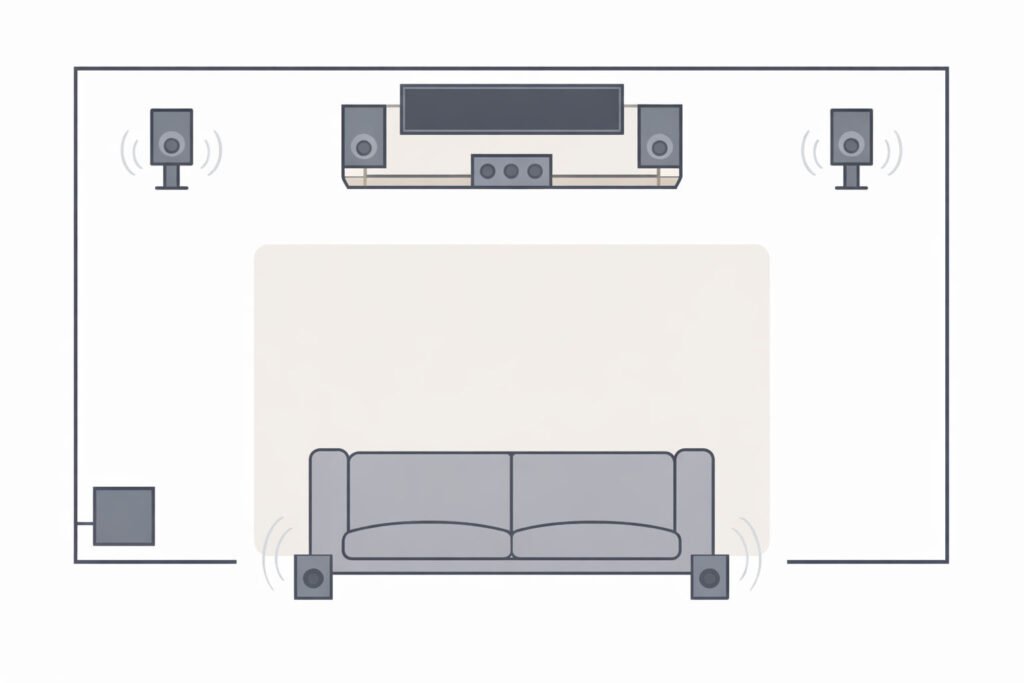
Speaker placement for small rooms (simple, reliable layout)
For speaker placement for small rooms, the author recommends a few stable principles:
- left/right speakers form a triangle with the main seat
- tweeters near ear height
- keep speakers away from corners when possible
- toe-in slightly if dialogue seems “off-center”
Where to place a center speaker (and what to avoid)
Where to place a center speaker is a frequent failure point. Avoid placing it deep inside a cabinet or behind objects. Ideally, it sits:
- centered under the TV
- slightly angled toward the listener
- with clear space in front of the drivers
Best budget speaker stands (why height matters)
Proper height improves clarity and imaging. Best budget speaker stands are often cheaper than upgrading speakers and the audible benefit can be immediate.
Living room cinema setup in an open plan
A living room cinema setup in an open floor plan needs compromise:
- surrounds may need creative placement
- rugs and curtains matter more
- sub placement needs more experimentation
This is where 5.1 setup in an open floor plan becomes about what’s possible, not what’s perfect.
Couch against wall workaround (surround without annoyance)
If the couch is against the wall, surrounds can feel too close. The author’s best speaker layout for a couch against wall approach is:
- mount surrounds slightly above ear level
- angle them to diffuse sound
- use receiver levels to soften harshness
Subwoofer Setup for Beginners (Big Bass Without the Boom)
Subwoofer placement tips (the two spots the author tries first)
Most beginners put the subwoofer wherever it fits and then they hate the boom. Better subwoofer placement tips start with two practical spots:
- near the front wall, not shoved into a corner
- along a side wall near the main seating line
The author also uses a simple “sub crawl” concept: place the sub at the listening position, play bass-heavy content, then walk around the perimeter to find where bass sounds smooth and controlled.
Powered subwoofer under $300 (what to prioritize)
A powered subwoofer under $300 can be worthwhile if it’s tuned correctly. The author prioritizes:
- clean output over extreme loudness
- controllable crossover and phase options
- a cabinet that doesn’t rattle
How to set crossover frequency (quick starting points)
Beginners often leave this wrong. How to set crossover frequency typically means:
- start around 80 Hz for many setups
- adjust slightly based on speaker size and room
In receiver menus this is often labeled Crossover frequency, and setting it correctly helps the sub blend rather than dominate.
Subwoofer too boomy how to fix (without buying anything)
If bass is overwhelming, the author’s subwoofer too boomy how to fix checklist is:
- move the sub 6–12 inches and retest
- lower sub level before lowering crossover
- use room correction if available
- add a rug/soft furnishings to reduce reflections
Wiring, Mounting, and Keeping It Clean (Budget Builds Look Better Too)
Speaker wire gauge guide (keep it simple)
A practical speaker wire gauge guide for beginners is straightforward. For many living rooms, Speaker wire (14 AWG) is a safe, flexible default without overthinking.
Banana plugs vs bare wire (what the author uses and why)
The author prefers banana plugs vs bare wire for ease:
- faster installation
- fewer stray strands
- easier troubleshooting later
TV wall mount cost guide (and when to skip it)
A TV wall mount cost guide doesn’t need to be complicated. Beginners should budget for:
- mount hardware
- possible longer HDMI cables
- cable concealment options
The author often recommends skipping wall mounting if the room layout is temporary or if cable routing will be messy; a clean media console can look better than a rushed mount job.
Cable management for media rooms (easy wins)
Cable management for media rooms is where beginner setups either look clean or look chaotic. The author’s approach:
- use labeled ties and a single routing path
- apply how to hide TV wires cleanly with raceways or behind-console channels
- practice how to label and route cables before plugging in everything
AV rack and media console ideas (keep airflow + access)
Good AV rack and media console ideas prioritize:
- ventilation for receivers
- easy access for cables
- stable placement for consoles and streaming boxes
Universal remote alternatives (reduce remote chaos)
If the household is juggling inputs and apps, universal remote alternatives can reduce friction without changing the entire system.
Room Acoustics on a Budget (The Invisible Upgrade)
Room acoustics on a budget (what matters most)
This is the “secret sauce” section. Room acoustics on a budget often beats expensive speaker upgrades. The author focuses on:
- rugs
- curtains
- softer furniture placement
- reducing hard reflections
How to reduce echo in a room (cheap changes first)
To how to reduce echo in a room, the author starts with:
- rugs in front of speakers
- curtains on large windows
- bookshelves or fabric décor on bare walls
Inexpensive acoustic panel alternatives (DIY-friendly)
Inexpensive acoustic panel alternatives can include:
- thick moving blankets in key reflection spots
- fabric wall hangings
- DIY panels using safe, non-irritating materials
Budget blackout curtains for glare (picture + sound benefits)
Budget blackout curtains for glare help the image and reduce harsh reflections that affect clarity.
Noise reduction for shared walls (apartment-friendly tactics)
For apartments and townhomes, noise reduction for shared walls means:
- controlling subwoofer levels
- using night mode
- decoupling the sub from the floor if possible
- being mindful of placement near shared boundaries
This pairs directly with night mode settings for apartments for respectful viewing.
Simple living room sound treatment (a quick before/after routine)
A simple living room sound treatment routine the author uses:
- add a rug
- add curtains
- move speakers slightly away from corners
- rerun room correction
- retest with the same scene
Calibration and Settings (Where Budget Systems Become Premium)
Home audio calibration basics (the author’s beginner checklist)
These home audio calibration basics are the difference between “it works” and “it’s impressive”:
- set speaker sizes correctly
- set crossover properly
- level-match channels
- confirm dialogue clarity modes
- run room correction once the room is arranged
SPL meter: do you need one?
A SPL meter can help match speaker levels precisely, but beginners can still succeed using receiver test tones and a phone app as a starting point. The author’s method is to get levels close, then adjust by ear using familiar scenes.
Dialogue clarity settings (quick wins for voices)
The author uses dialogue clarity settings sparingly just enough to lift voices without making them sound unnatural. This supports the goal to improve dialogue without raising volume.
Lip sync delay fix (when mouths don’t match sound)
A lip sync delay fix is usually a settings tweak:
- adjust audio delay in the TV or receiver
- simplify the chain (fewer pass-through devices)
- ensure a stable HDMI connection
Late-night listening modes (keep neighbors happy)
Late-night listening modes can compress dynamic range so whispers stay audible while explosions stay controlled very useful for shared living.
Sample Shopping Lists (U.S. Budget Tiers + Upgrade Paths)
Tier 1: Bare-bones but legit (entry level)
Two common choices:
- a soundbar path (especially if it’s the best value soundbar for movies)
- a simple 2.1 path with entry speakers and a modest sub
Target categories:
- reliable soundbar with ARC/eARC
- OR two bookshelf speakers + basic amplifier/receiver + sub
Tier 2: Dialogue-first 3.1
Target categories:
- left/right speakers that image well
- a best cheap center channel speaker positioned correctly
- subwoofer tuned for balance, not boom
Tier 3: Starter surround 5.1
Target categories:
- a starter 5.1 speaker package for consistency
- a receiver with room correction
- surround placement adapted to the room (especially couch-against-wall cases)
Smart upgrades (what the author would upgrade first)
The author’s sequence:
- subwoofer quality and placement
- center channel and dialogue tuning
- surrounds (if the room allows)
- Atmos only after the basics are dialed in, using Dolby Atmos beginner options
Common Mistakes the Author Made (So the Reader Doesn’t)
Overspending on wattage and ignoring setup
The author learned this the hard way: receiver wattage myths explained matters because beginners chase numbers instead of results. Setup, placement, and calibration usually produce bigger gains than chasing watt ratings.
Buying gear without checking compatibility
Compatibility issues can silently limit performance. The author now checks for:
- HDCP 2.2 support in the chain
- stable HDMI eARC behavior if using eARC
- format support like Dolby Digital Plus when streaming
Putting speakers “where they fit,” not where they sound right
Even excellent speakers underperform when shoved into corners, hidden in cabinets, or placed too low. The author treats placement as a first-class upgrade.
Simple Checklist for First-Time Setup (Print-Friendly)
This simple checklist for first-time setup is the order the author follows:
- Place TV/console and ensure ventilation.
- Set left/right speakers at ear height (use stands if needed).
- Place the center speaker correctly (not blocked).
- Run speaker wire neatly (label both ends).
- How to connect speakers to receiver: match polarity (+/–) and tighten connections.
- Complete HDMI ARC and eARC setup between TV and receiver/soundbar.
- Connect streaming device/console and confirm video handshake.
- Set speaker sizes in the receiver and how to set crossover frequency to a sensible starting value.
- Run how to run room correction once the room is arranged.
- Adjust dialogue settings lightly for clarity.
- Confirm lips match voices; apply audio delay if needed.
- Calibrate TV picture for movies using a cinema preset and basic adjustments.
- Apply how to label and route cables for easy future troubleshooting.
- Test with one movie scene, one show, and one game.
- Make small placement tweaks before buying anything else.
FAQs
FAQ 1 — What’s the best beginner layout: 2.1, 3.1, or 5.1?
For most U.S. living rooms, 3.1 is the best balance because the 3.1 system benefits for dialogue are immediate, but a well-done 2.1 can also be excellent. The choice comes down to room size and layout, which is why the 2.1 vs 3.1 vs 5.1 system decision should be made before shopping.
FAQ 2 — Should someone start with a soundbar or an AV receiver?
A soundbar is easiest; a receiver is more upgrade-friendly. The right call depends on space, patience for setup, and upgrade plans. That’s why a soundbar vs receiver comparison and an entry-level AV receiver guide are useful before spending.
FAQ 3 — Why is ARC not working on a TV?
Most issues come from settings, handshake, or cable problems. Use the ARC not working troubleshooting steps and confirm CEC (Consumer Electronics Control) is enabled if ARC requires it on that TV model.
FAQ 4 — How does someone fix eARC audio dropouts?
Start with cable quality and routing. The most common fix is using a cable that meets HDMI cable specs for 4K, keeping runs shorter, and following an eARC audio dropouts fix flow (reboot order and simplified chain).
FAQ 5 — Where should someone place a center speaker for clear dialogue?
The center speaker should be centered under the TV, not blocked, and angled toward the main seat. Combine correct where to place a center speaker placement with mild dialogue clarity settings.
FAQ 6 — How does someone stop a subwoofer from sounding boomy in an apartment?
Move the sub, lower the level, rerun correction, and reduce reflections. If the building is sensitive, prioritize noise reduction for shared walls and apply night mode settings for apartments along with subwoofer too boomy how to fix steps.
FAQ 7 — Does a budget build need Dolby Atmos?
No. Dolby Atmos beginner options can be fun, but they should come after the fundamentals. If adding height effects, compare ceiling speakers vs upfiring modules and keep expectations realistic for the room.
FAQ 8 — Is a projector worth it for a beginner?
It can be, but it’s more dependent on light control and space. Beginners should weigh projector vs TV for beginners and plan for budget projector screen options to avoid disappointment.
FAQ 9 — What streaming device should someone buy for 4K and better audio?
If the TV is slow or apps are unstable, a dedicated streaming device for 4K TV helps. Many households do well with Apple TV 4K, and Roku Ultra is also popular for simplicity.
FAQ 10 — How does someone fix lip sync delay between video and audio?
Use a lip sync delay fix by adjusting audio delay on the TV/receiver, simplifying pass-through steps, and ensuring the HDMI chain is stable.
Conclusion
If the author were starting over this weekend, the recommendation would be to pick one path 2.1, 3.1, or 5.1 then spend time on setup instead of shopping. In budget systems, correct placement, clean connections, and calibration create the largest improvements.
Once the system is stable, upgrades become “fun improvements” instead of “expensive attempts to fix fundamentals.”
Author Bio
Mark Ellison writes practical home entertainment guides focused on beginner-friendly setups, clear dialogue, and real-room layouts. Published by Ahmed Saeed.